
What is DEXPI? The P&ID data standard explained
DEXPI is the open standard for exchanging P&ID data between engineering tools — the plant's objects, attributes and connections, not just the picture. This guide covers where it came from, how the versions differ, what you can do with a DEXPI file and how to check one before you rely on it.
The problem DEXPI solves
A P&ID moves between many hands over a plant's life: the licensor, the FEED contractor, the EPC contractor, the owner's engineering team, maintenance and later modification contractors. Each tends to use a different P&ID design tool, and for most of the industry's history the only format they shared was the drawing itself — a PDF or a CAD file. Every hand-over lost the intelligence (the objects, attributes and connections) and the next party redrew or retyped what it needed.
DEXPI — Data Exchange in the Process Industry — is a vendor-neutral specification for exchanging that intelligence. A DEXPI file carries the plant items on a P&ID, their attributes and how they connect, together with the graphics needed to draw the sheet again. A receiving tool can rebuild an intelligent P&ID rather than a picture of one.
Who is behind it
The DEXPI initiative was launched in 2011 by owner-operators (BASF, Bayer, Evonik), software vendors (Autodesk, AVEVA, Bentley, Intergraph, Siemens), research organisations (AixCAPE, RWTH Aachen) and an engineering company (Air Liquide), as a working group of ProcessNet, the joint platform of DECHEMA and VDI (OPC Foundation summary).
After years as an initiative under the DECHEMA roof, the work moved to a registered association, DEXPI e.V., founded on 26 October 2023 at DECHEMA House in Frankfurt am Main (dexpi.org). Its founding members include operators (BASF, Bayer, Equinor, Evonik, Shell), software vendors (Aucotec, Autodesk, AVEVA, Cadmatic, Hexagon, PTC, Semantum) and specialist firms; more operators and vendors have joined since. The association publishes the specification and organises an annual congress, PIDMIC (Process Industry Data Model Integration Congress); certification test rounds for software have been run since the initiative's early years.
What a DEXPI file contains
The specification describes a P&ID as a set of typed objects. Broadly:
- Equipment — vessels, pumps, exchangers, columns — with their nozzles.
- Piping — piping network systems and segments (which carry line attributes such as nominal diameter, fluid code and piping class) and the piping components on them: valves, reducers, flanges, spectacle blinds, off-page connectors.
- Instrumentation — process instrumentation functions (the bubbles), signal lines, actuating systems linking a controller to the valve it moves.
- Connections — what joins to what, so the drawing can be traversed as a network.
- Graphics — symbols, positions and labels, so a receiving tool can draw the sheet as issued.
- Metadata — drawing number, revision and title-block information.
The information model is based on ISO 15926, the standard for integrating life-cycle data for process plants, which is what makes the classes and attributes consistent between tools (DEXPI specification).
Versions: Proteus XML and DEXPI 2.0
Up to version 1.4, a DEXPI P&ID was serialised in Proteus XML, an XML schema for plant data that predates DEXPI; the DEXPI specification defined how a P&ID was expressed in it. Version 1.4 was released at the end of 2024.
DEXPI 2.0, published on 10 October 2025, is the first version that uses its own format, DEXPI XML, for both the specification and the files, with a UML-based information model. In the association's words, DEXPI "can be fully used without the need for implementation of Proteus XML schema". The P&ID content itself — the plant model — is unchanged from 1.4 (dexpi.org announcement). DEXPI 2.0.1, released on 30 September 2026, replaces 2.0 and includes a reference example P&ID (specifications).
In practice this means two families of files will be in circulation for years: 1.3 and 1.4 files from tools that implemented Proteus, and 2.x files from tools that have moved on. When someone offers "DEXPI", ask which version — a 2.0 reader does not automatically read a 1.3 file, and the other way round.
Which tools support it
The DEXPI software list names, among others, AutoCAD P&ID and Plant 3D, AVEVA P&ID (import and export) and AVEVA Diagrams (export), CADMATIC (DEXPI 1.3 import and export), Siemens COMOS P&ID, AUCOTEC Engineering Base and Hexagon Smart P&ID (through a DEXPI post-processor), plus a growing number of specialist tools. DEXPI e.V. has also run certification test rounds; its certificates page lists, for example, export certificates for AutoCAD Plant 3D and SmartPlant P&ID (DEXPI 1.2) and import and export certificates for AutoCAD P&ID/Plant 3D (DEXPI 1.3).
Support is not binary. A tool may export but not import, support one version, or export a subset of attributes. Before a project relies on DEXPI exchange, test it: export a representative sheet from the sending tool, open it in the receiving tool, and compare against the PDF.
What you can do with a DEXPI file
- Hand over intelligent P&IDs between contractor and owner without redrawing, whatever tools each side uses.
- Generate registers — line list, valve list, instrument index, equipment list — straight from the drawing. (See line lists from P&IDs.)
- Compare revisions as models rather than pictures. (See revision comparison.)
- Prepare safety work — HAZOP nodes, isolation envelopes — by traversing the connections. (See HAZOP preparation and isolation planning.)
- Feed other systems — asset registers, digital twins, simulation — with the plant's topology. Open-source libraries such as pyDEXPI load DEXPI into Python and turn it into a graph for analysis.
How to check a DEXPI file
A DEXPI file can be valid XML and still be a poor model. Check it at four levels:
- Does it open and draw? Render it and lay it next to the issued PDF. Missing symbols, stray lines and labels in the wrong place show immediately.
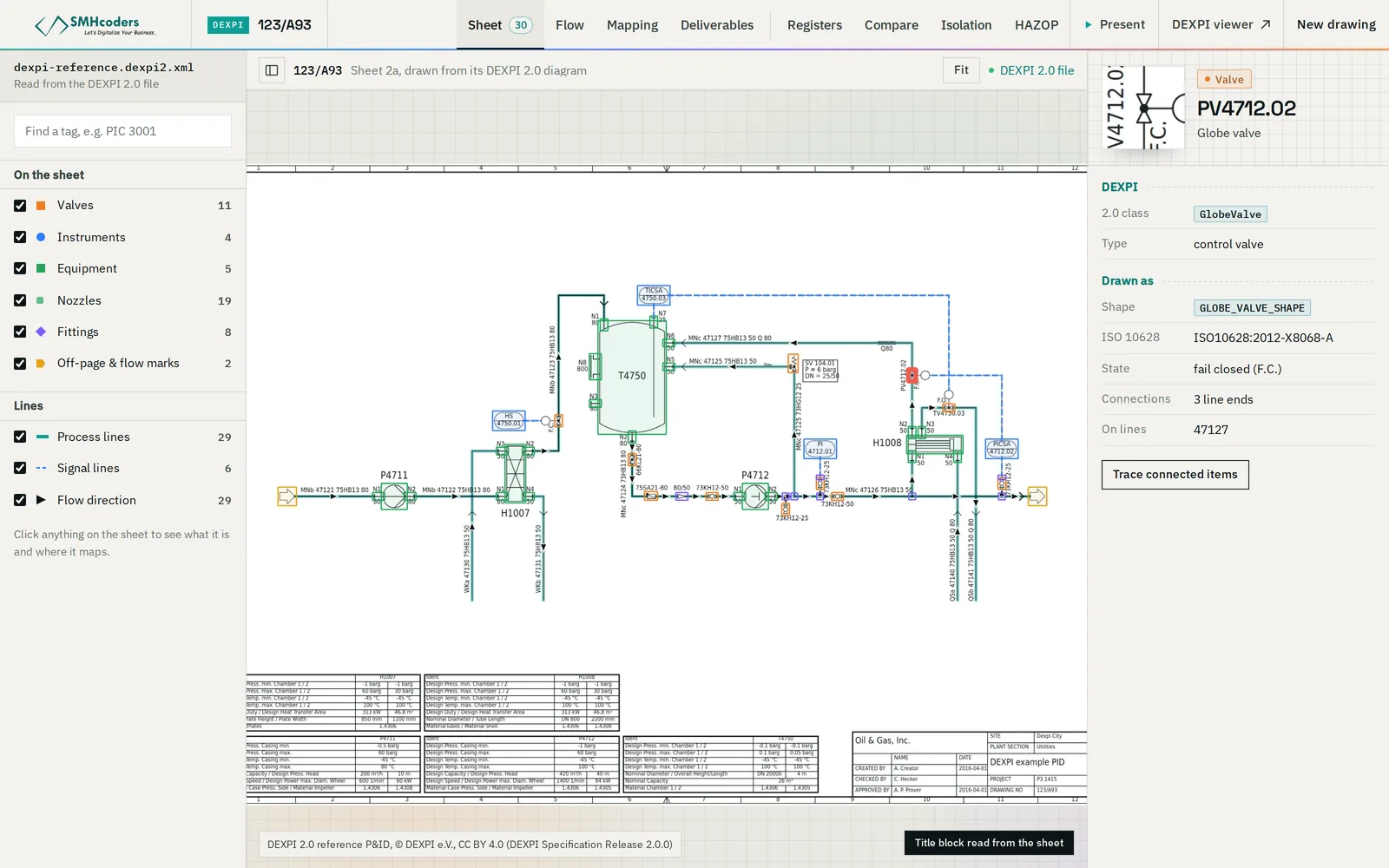
- Does it conform? Run it through a validator. Options include the DEXPI Verificator (dexpi.aixcape.org), the free base version of the pnb Toolbox listed on dexpi.org, and pyDEXPI's own checks. Our free browser Viewer & Verificator checks DEXPI 2.0 files without uploading them.
- Is it complete? Count what matters against the drawing: equipment, valves, instruments, line numbers. A schema check will not tell you that half the valves were exported as anonymous graphics. Conformance is not coverage.
- Is it connected? Every piping segment should have two ends; every nozzle should connect to something or be deliberately open; off-page connectors should name where the line continues. Trace one line you know end to end.
Checks 3 and 4 are where exported files most often fall short, because they depend on how carefully the original drawing was built in its tool, not just on the export.
Using DEXPI on a project
DEXPI exchange works best when it is specified, not hoped for. On a new project or a modification package:
- Write it into the deliverables. Name the version (2.0.1, or 1.4 where a party's tool has not moved on), the direction of exchange, and the attribute set expected on each class — the tag, line number parts, fail actions and normal positions you rely on downstream.
- Test the exchange in the first month. One representative sheet, exported by the sender and opened by the receiver, checked at the four levels above. Fix mapping problems while the drawing count is small.
- Keep identifiers stable. DEXPI objects carry identifiers. If the sending tool keeps them stable between revisions, revision comparison becomes exact; if it regenerates them on every export, comparison has to fall back on tags and positions.
- Keep the PDF as the document of record until the receiving side has accepted the model, and issue both together at each revision.
DEXPI e.V. also publishes a separate DEXPI Process specification (1.0, end of 2023) for process-design information upstream of the P&ID. The rest of this guide is about the P&ID specification, which is what most tools mean by "DEXPI support".
What DEXPI does not do
- It describes P&ID content. Process data sheets, line design conditions, instrument ranges and maintenance history live elsewhere, though DEXPI's attributes can carry some of them.
- It does not enforce your company's conventions: tag formats, line-numbering rules and design standards still need their own checks.
- It does not make a drawing right. A faithful DEXPI file of a wrong or out-of-date P&ID is a faithful copy of the error.
Our Viewer & Verificator opens DEXPI 2.0 files in the browser, draws the sheet from the model, shows how it connects and checks it against the DEXPI validation rules — without uploading the file. It is free: open the viewer. For drawings that are not DEXPI yet, the P&ID Converter writes DEXPI 2.0, 1.4 and 1.3 from PDF, scans and DXF.
 SMHcoders engineering teamAbu Dhabi · first published 20 Nov 2026 · updated 20 Nov 2026