
HAZOP node preparation, read from the P&ID.
Walk into the HAZOP with the drawing already read. Before a HAZOP, someone spends days marking nodes on the P&IDs and listing what protects each one. HAZOP Prep does that reading from the DEXPI model: candidate nodes, the alarms, trips, relief valves, check valves and controllers in each, and a guideword worksheet with the causes the drawing implies — a control valve failing closed, a pump stopping. The team does the rest.
Give the facilitator a prepared draft — nodes, safeguards and drawing-derived causes — so session time goes on consequences and recommendations, which only the team can judge.
Nodes colour in. Click one for its worksheet.
The illustrative sheet split into three candidate nodes. Click a node: its safeguards are listed, and the guideword rows show causes read from the drawing. The consequence and recommendation columns stay empty — they belong to the team.
- Causes come from the equipment on the sheet
- A cause without a safeguard is shown, not judged
- Illustrative sheet — not a client drawing
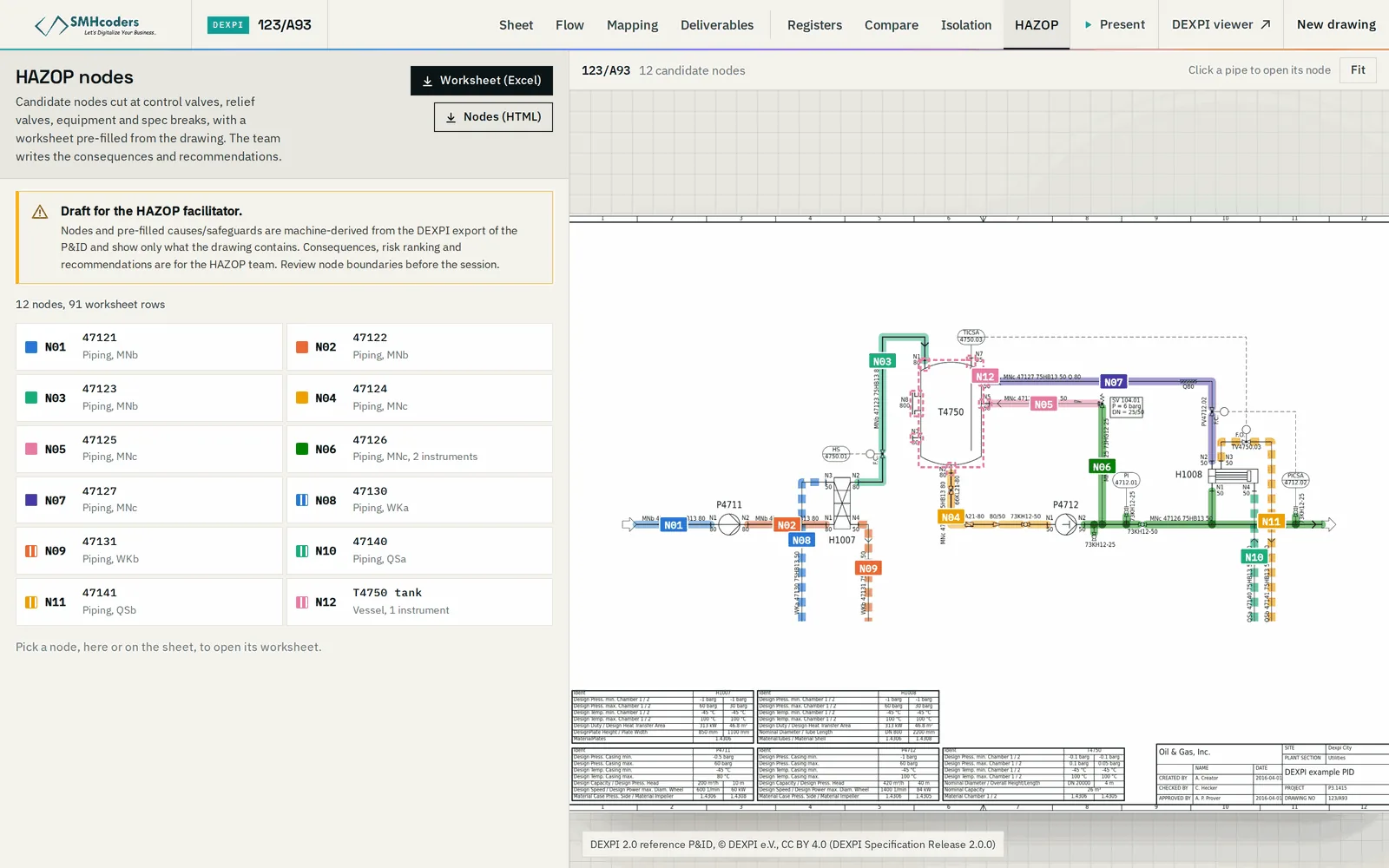
The sheet split into nodes at equipment and control boundaries, for the facilitator to accept, merge or redraw.
Alarms, trips, relief valves, check valves and controllers found in each node — the protection the drawing shows.
Guideword rows pre-filled with the causes the equipment implies: a control valve failing open or closed, a pump stopping, a block valve shut in error.
A cause with no safeguard on the drawing is shown as such — a prompt for the team, not a finding.
Each node coloured on the drawing, so the marked-up P&ID for the session comes with the worksheet.
Consequences, risk ranking and recommendations are not generated. They need the team's knowledge of the process.
The preparation, not the study
A HAZOP is a team's judgement. What can be read off the drawing beforehand, is.
A converted drawing, or DEXPI from your design tool.
Candidate nodes proposed; the facilitator adjusts them.
Safeguards listed and causes written for each guideword.
The team adds consequences, ranking and recommendations.
What it does not do.
Machine-extracted output is verified against the issued drawing. Beyond that, what to know before you rely on it:
- L1
A draft for the facilitator, not a HAZOP. It does not assess consequences, rank risk or make recommendations.
- L2
It sees only what the P&ID shows. Operating procedures, process conditions and plant history are for the team to bring.
- L3
Machine-extracted from converted drawings: verify against the issued drawing before the session.