
Isolation points from the P&ID, drafted for permit-to-work.
Where to close, what to vent, what to watch. Choose the item that needs work. Isolation Planner follows the piping in the DEXPI model outward until it reaches block valves, and returns the envelope: the boundary valves to close, the vents and drains inside it, the instruments it encloses — and a warning wherever the drawing alone does not give a positive isolation.
Take the drawing-reading out of permit-to-work preparation, so the isolation authority starts from a complete draft instead of a blank sheet — and still makes the decision.
Pick an item. Watch the envelope close.
Click the pump, a control valve, the exchanger or an instrument on the illustrative sheet. The envelope fills, the boundary valves light up, and the warnings say where the drawing alone is not enough.
- Check and control valves are passed through — they are not positive isolation
- Envelopes that leave the sheet are flagged
- A draft for the isolation authority — not an isolation certificate
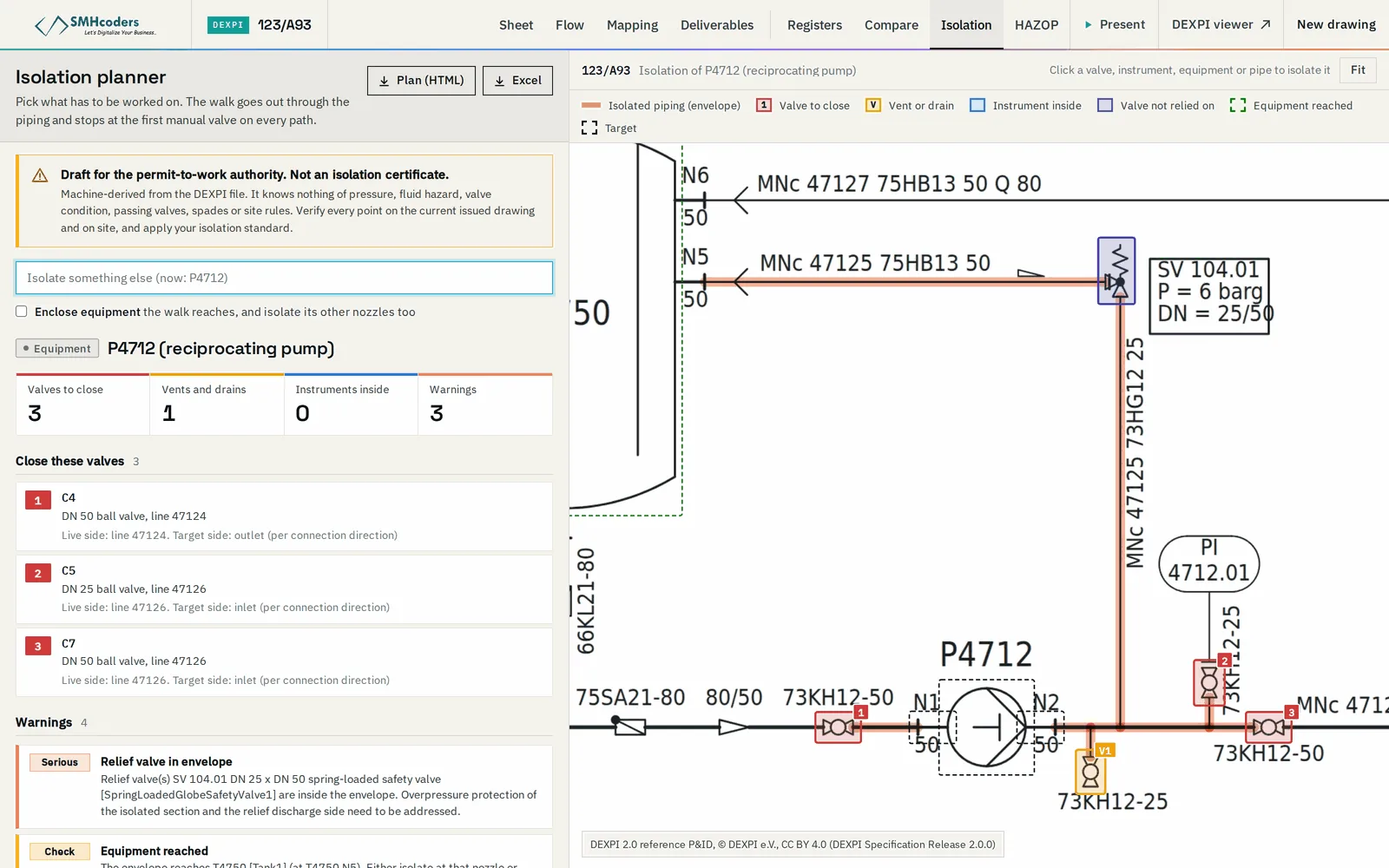
The block valves that close the envelope on every side, found by following the piping — branches and small-bore connections included.
The vent and drain points inside the envelope, for depressurising and draining once the boundary is closed.
Transmitters, gauges and relief valves within the envelope, with their root valves where the drawing shows them.
A check valve or control valve on the way is flagged — neither is a positive isolation — and the search carries on to the next block valve.
Each boundary is reported as a single valve or a double block and bleed, to be held against your isolation standard.
Where the envelope runs off the sheet, it says so and names the connector: the boundary is on another drawing.
From a tag to a draft isolation
The planner prepares. The isolation authority decides, verifies on site and signs.
Select the valve, instrument, line or equipment to be worked on.
The piping is followed outward through the model to the nearest block valves.
Check valves, control valves, off-sheet runs and single-valve boundaries flagged.
A marked sheet and a list, for the isolation authority to verify and approve.
What it does not do.
Machine-extracted output is verified against the issued drawing. Beyond that, what to know before you rely on it:
- L1
A draft for the isolation authority — not an isolation certificate. It does not replace your permit-to-work or isolation procedure, a walk-down on site, or the authority's sign-off.
- L2
It knows what the drawing shows. Valve condition, passing valves, electrical and other energy isolations are not on the P&ID and are not covered.
- L3
Machine-extracted from converted drawings: verify against the issued, as-built drawing.
- L4
An envelope that runs off the sheet needs the connected sheet to finish it.