
P&ID digitisation and DEXPI tools for engineers.
Your P&IDs, converted once and put to work. P&ID Studio is a set of tools for the engineers who work with P&IDs. A drawing — a PDF, a scan, a DXF, or DEXPI exported from your design tool — becomes a DEXPI model once. Then it is checked against the standard, listed into registers, compared between revisions, and used to prepare isolations and HAZOP worksheets.
Try the live demo The full Studio on the public DEXPI reference P&ID
Read the drawing once. Use it everywhere.
One neutral model of the drawing, and every tool working from it — so the line list, the revision review, the isolation draft and the HAZOP worksheet all agree with the P&ID and with each other. DEXPI is the neutral interface: the tools work the same on a drawing our Converter digitised and on DEXPI exported from a commercial P&ID design tool.
One sheet, every tool.
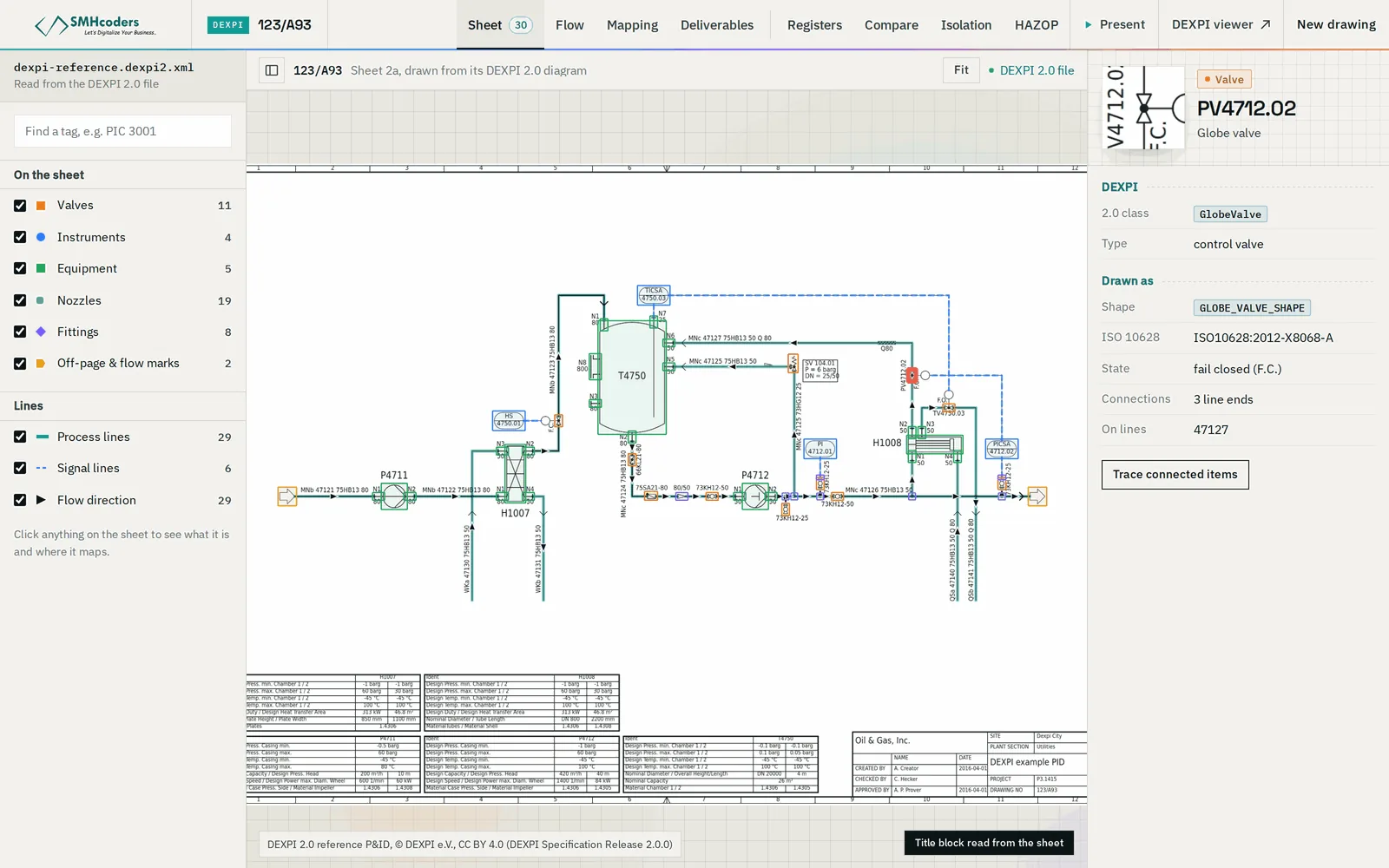
An illustrative sheet — a tank, a pump, a cooler and the valves and instruments around them. Step through it: the scanned drawing, the DEXPI model the Converter makes of it, then what the tools do with that one model.
- The same sheet runs through every tool page
- Hover or tap the model to see each component's class
- Made-up tags — not a client drawing
Check it, list it, compare it, plan with it.
Every tool works on a DEXPI model — converted by us, or exported from your design tool. Open any of them for a live demo on the illustrative sheet.
P&ID Converter
PDF, scanned or DXF P&IDs converted to DEXPI 2.0, 1.4 or 1.3 — symbols, connectivity and title block — plus a re-drawn DXF, with a human review step before release.
Viewer & Verificator
Open a DEXPI 2.0 file in the browser, see the sheet and how it connects, and check it against the DEXPI validation rules. The file never leaves your machine.
Registers
Line list, valve list, instrument index, equipment list and off-page connectors — read from a DEXPI model into Excel, each row traceable to the drawing.
Revision Compare
Two revisions of a P&ID compared as models: components added, removed and changed, line size and class changes, rewiring — grouped by line and marked on the drawing.
Isolation Planner
Pick a valve, instrument or line: the boundary valves to close, the vents and drains, the instruments inside and the warnings — a draft for the isolation authority.
HAZOP Prep
The P&ID split into candidate nodes, each node's safeguards listed, and a guideword worksheet pre-filled with causes read from the drawing — consequences and recommendations left to the team.
P&ID Generator
Issue-ready P&ID drawings generated from a guided engineering questionnaire — eight drawing families, native DXF and PDF.
API for software vendors
Digital twin, HAZOP and asset-information software that needs to ingest P&IDs: drawing in, DEXPI and registers out.
Ask your P&ID
Questions in plain language over the drawing's graph — which valves isolate this pump, what is downstream of this line. Coming.
Start free. Pay for the sheets you run.
The viewer is free and runs in your browser. Conversion and the tools are priced per sheet. Software vendors take the API; owners with drawing archives, or drawings that cannot leave the network, take the enterprise route.
- Open DEXPI 2.0 files
- Sheet and graph view
- DEXPI validation rules: errors, warnings, profile checks
- Runs locally — files are never uploaded
- Convert PDF, scanned or DXF sheets
- Or upload DEXPI exported from your design tool
- Registers, revision compare, isolation and HAZOP drafts on the model
- Pay for the sheets you run
- PDF, scanned or DXF drawings in — DEXPI out
- Registers and connectivity as data
- Called from your product's own import step
- By arrangement — talk to us
- Legacy drawing archives digitised in batches, with human QA
- Deployed inside your network — drawings never leave it
- P&ID Generator: generation from engineering intent, built for your drawing families
- Scoped and quoted per project
Your drawings are not our data.
P&IDs describe how a plant is built and protected. The Studio is designed so you choose how far a drawing travels: not at all, for the length of a job, or never outside your network.
The Viewer & Verificator reads your DEXPI file in your browser. It is never sent to us, so there is nothing for us to keep.
Drawings you upload are processed for your job and deleted.
For drawings that may not leave your network, the Studio is deployed inside it — conversion, review and tools, with nothing sent out.
Send us your NDA with the first drawing, or ask for ours before you send anything.
Open data in, open data out.
DEXPI is the open, vendor-neutral standard for P&ID data, built on an ISO 15926-based information model. Writing DEXPI 2.0, 1.4 and 1.3 means the model the Studio makes is not locked in the Studio: digital twin, HAZOP and asset-information software can read it too.
Every review comment, checked against the change.
Revision Compare also runs inside ReviewMate, our engineering document review platform. When a contractor resubmits, each open comment is checked against the comparison: did the drawing actually change where the comment asked? A comment is closed on evidence on the sheet, not on a reply.
Send us one sheet.
Pick a sheet you know well. We run it through the Converter and walk you through the DEXPI model, the registers and the re-drawn DXF on a call — so you judge the output on a drawing you can check yourself.
- PDF, scan, DXF or DEXPI
- NDA first if you need one
- An answer within one business day, Gulf hours
Attach the sheet to the form, up to 25 MB. It goes to our engineers at Sales@SMHcoders.com and nowhere public; ask for an NDA first if you prefer, and send it after.
The engineering behind the tools.
Six guides for the engineers who work with P&IDs: digitising legacy drawings, the DEXPI standard, registers, revision review, isolation planning and HAZOP preparation. All P&ID guides
What is DEXPI?
DEXPI is the open, vendor-neutral standard for exchanging P&ID data, maintained by the DEXPI initiative of operators, contractors and software vendors. Its information model is based on ISO 15926. A DEXPI file carries the components, their attributes and how they connect — not just the picture of the drawing.
Which drawings work?
PDF exports, scanned sheets and DXF go through the Converter. DEXPI files exported from P&ID design tools open directly in every tool. If you are unsure about a drawing, send us one sheet.
Do our drawings leave our network?
Not with the Viewer & Verificator — it runs in your browser. Drawings you upload are processed for your job and deleted. Where drawings may not leave your network at all, the Studio is deployed on-premises.
How is it priced?
The viewer and verificator are free. Conversion and the tools are priced per sheet, with credits. API use and enterprise deployments are quoted per scope.
Can we rely on the output?
Treat it as engineering data that still needs an engineer. Everything is machine-extracted and should be checked against the issued drawing; isolation and HAZOP outputs are drafts for the isolation authority and the HAZOP facilitator, not decisions.
Is the P&ID Generator part of it?
Yes, as custom work. Generating P&IDs from engineering intent is built for your drawing families and symbol library, so it is scoped with you — talk to us.
Send us a drawing.
One sheet is enough to see what the Studio makes of your drawings.